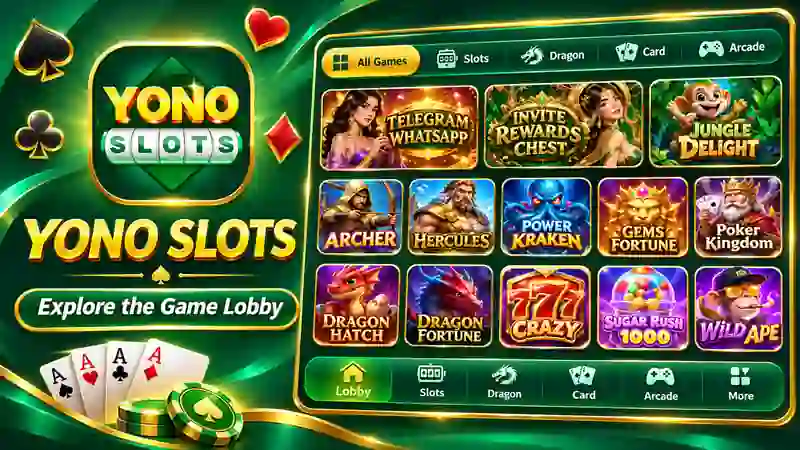





Yono Slots brings together a large collection of slot games, with artwork ranging from ancient gods and mythical beasts to lucky symbols and treasure hunts. Open the game section and there is quite a lot to browse. Zeus, Zeus II, Zeus III, Ganesha, Crazy 777 and Xerxes are among the titles featured in the collection. Other covers include Fortune Gems, Poker Kingdom, Money Coming and Power of the Kraken.
Browse Games and Find Your Favourites
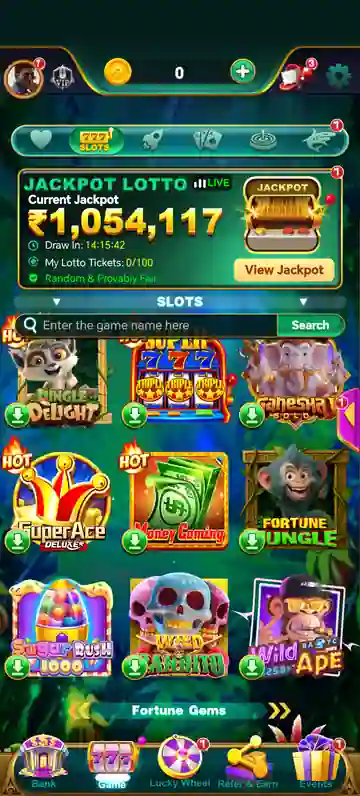
Scrolling through the lobby brings up a changing mix of familiar titles and other games worth a look. Some covers carry Hot or New tags, while jackpot amounts are displayed above selected games. The small green download symbols are another detail found on many of the covers. Rather than going through the entire collection every time, players can use the search field to enter a title directly. There is also a heart-shaped tab at the top of the page. Tap into it to view the Favourite section, where selected games are gathered separately from the main Slots list.
Take a Look at Jackpot Lotto
The Jackpot Lotto panel has a prominent position near the top of the home screen. It displays a live label, a current jackpot amount and a countdown showing the time until the draw. A My Lotto Tickets counter is included beneath the main figure, alongside a View Jackpot button. The panel is hard to miss when opening the app, particularly with its bright green background and gold jackpot artwork. It gives the lobby a lottery feature alongside its regular slot collection.
Promotions and Other Activities
Yono Slots has more than game covers on its home page. Promotional artwork appears between sections, including an Invite Rewards Chest banner advertising up to 1,000 coins. The bottom menu also has separate entries for Lucky Wheel, Refer & Earn and Events. These sections give the app a few different areas to visit when you are not browsing the slot catalogue. The Lucky Wheel has its own colourful icon, while the referral and event shortcuts are placed beside the main Game and Bank tabs.
A Closer Look at the App Layout
Your coin balance is displayed along the top edge, with an add button beside it. The same area contains the profile, message and settings icons. Below that, a row of category symbols provides access to different collections, while the main area is reserved for game titles and promotional panels. The layout is busy, but its main sections are easy to distinguish once you become familiar with the icons. You can move from the game lobby to your favourite titles or other activities using the shortcuts at the top and bottom of the screen.
Explore More with Yono Slots
There are plenty of names to discover in Yono Slots, whether you are drawn to the Zeus titles, colourful dragon games or classic 777-style artwork. Search for a specific game, browse the categories or save titles to your favourites for another visit. The Jackpot Lotto display, promotional banners and additional activity sections add more variety to the app’s main lobby, giving you several places to explore beyond the standard game list.







Comments (0)
No comments yet. Be the first!