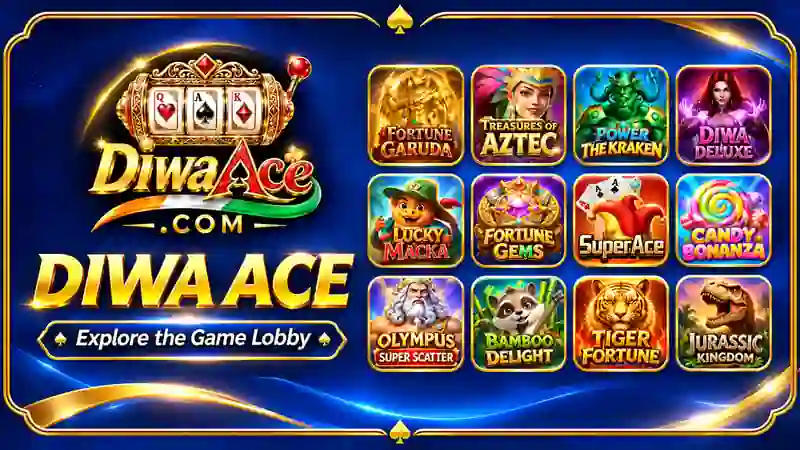






Open DiwaAce and the first thing you see is a screen full of game covers. They come in all sorts of styles: golden animals, jungle scenes, fantasy characters, treasure-themed artwork and colourful casino symbols. The collection is arranged in rows, so you can scroll through the lobby and see what catches your attention.
Take a Look at the Game Selection
There are quite a few different names in the DiwaAce lobby. Fortune Gems, Super Ace, Dragon Hatch and Power of the Kraken appear alongside titles such as Sweet Bonanza 1000, Wisdom Athena 1000, Fortune Wheel Deluxe and Jungle Queen. Other visible games include Le Pharaoh, Le Bandit, Fortune Tree, Double Fortune and Fortune Monkey. The artwork varies considerably from one title to another. You might see a pharaoh in one row, a dragon in the next, followed by a game built around fruit or lucky symbols.
Finding Your Next Game
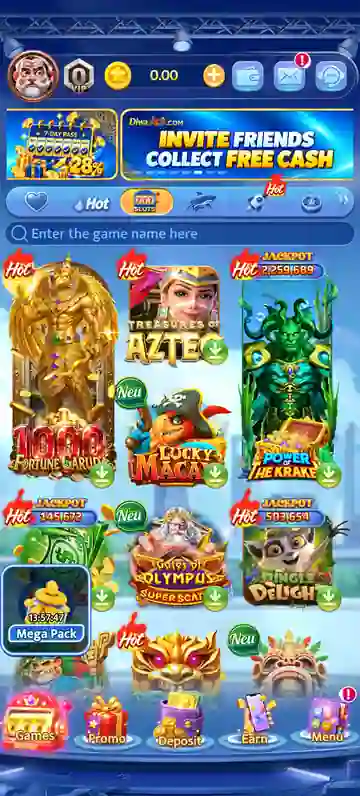
Spotted a title you want to try? Enter its name in the search box near the top instead of scrolling through every page of games. The lobby also has a Hot category, and some covers carry their own labels. A red Hot marker, a green New tag or a Jackpot figure can appear above a game icon. The titles are displayed three across, so a few options are visible together as you move down the screen. It is easy to pause on a cover that looks interesting and come back to the others later.
Check the Latest DiwaAce Offers
Promotional banners take turns appearing above the game collection. One asks players to invite friends in exchange for a free cash offer. Another advertises a seven-day pass, with daily cashback of up to 28%. The selected-game challenge has its own seven-day rewards, while a separate banner promotes a daily login mystery reward. VIP upgrades are featured too. Each banner has a different message, so it is worth opening the promotion itself if you want to know the details. The advertised figures are not a substitute for reading the eligibility rules and conditions.
Moving Around the App
One detail that stands out is the row of five icons at the bottom of the screen. They are labelled Games, Promo, Deposit, Earn and Menu. You do not have to scroll back to the top just to reach these sections; the shortcuts remain in view beneath the game collection. The upper bar is arranged differently, with the profile picture, coin balance and message-related icons grouped together. It is a compact layout, with most of the available space reserved for the games themselves.
A Closer Look at DiwaAce
Fortune Gems, Dragon Hatch, Super Ace and Sweet Bonanza 1000 are among the titles visible in the DiwaAce lobby. Their artwork gives the collection a varied appearance, and the search field is useful when you would rather enter a name than browse every row.








Comments (0)
No comments yet. Be the first!